
How to Check Backlinks of a Website: A Step-by-Step Guide
A backlink is a link from one website to another. When another site links to yours, search engines see it as a small vote of trust. Enough of the right votes, from the right sites, and your pages start to rank higher.
Checking backlinks means looking at who links to a website. It means seeing how many sites link to it. It also means judging what those links actually say about it. This matters for your own site. It also matters when a competitor keeps beating you in search results.
In this guide, you’ll learn how to check backlinks of a website. We’ll cover free tools, Google Search Console, and dedicated backlink checkers. You’ll also learn how to read what you find. A long list of backlinks means nothing if you don’t know how to judge it.
What Are Backlinks?
What Is a Backlink?
Site A has a link. That link leads to Site B. That link is a backlink for Site B. It’s also called an inbound link. From Site A’s side, it’s simply an outbound link.
That’s the whole idea. The hard part comes later. You need to know which backlinks actually help. You need to know which ones don’t matter at all.
Why Are Backlinks Important for SEO?
Search engines use backlinks as one signal among many. This signal helps them judge how trustworthy a page is. A page that earns links from strong, relevant sites looks more credible. A page nobody links to does not.
Backlinks also help with discovery. Search engine crawlers follow links to find new pages. A backlink from an active site can help your new page get indexed faster.
There’s another benefit too. It’s called referral traffic. A backlink on a busy page can send real visitors your way. This happens no matter what it does for your rankings.
More backlinks do not always mean better rankings. A hundred weak links from random sites can do less than five links from sites your audience actually reads.
Backlinks vs. Referring Domains
People mix up these two terms all the time. Let’s separate them early.
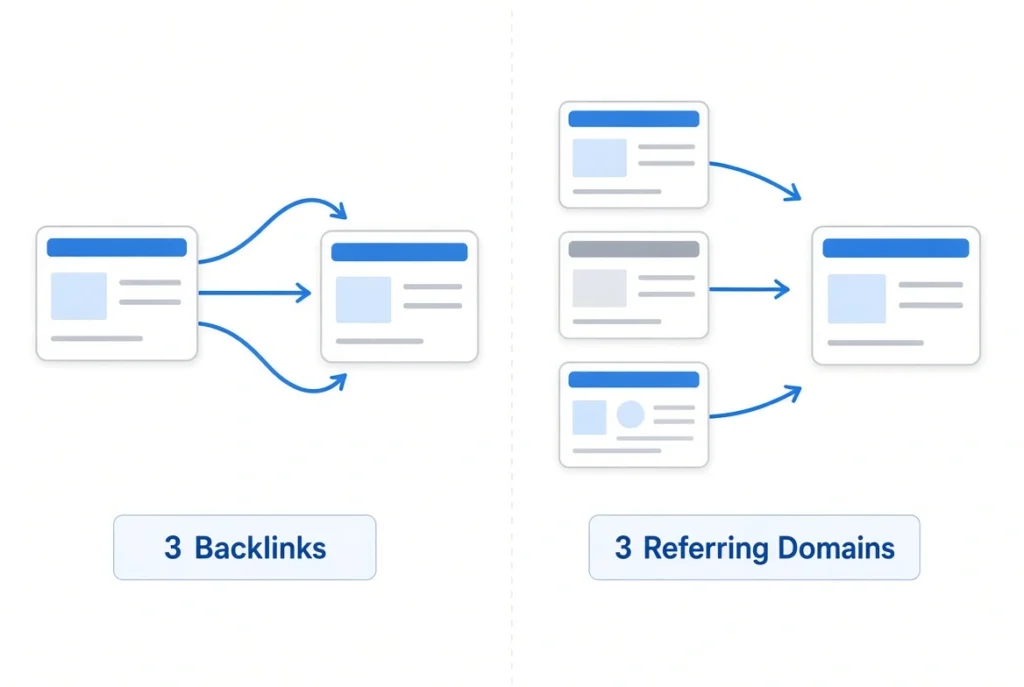
A backlink is one single link. A referring domain is the website that the link came from.
Here’s an example. A blog about project management links to your article three times. Those links appear in three different posts. That’s three backlinks. But it’s only one referring domain.
This matters. Ten backlinks from one domain carry less weight than ten backlinks from ten different domains. A wide set of referring domains looks more natural. It shows broader interest in your content.
Why Should You Check a Website’s Backlinks?
Understand Your Website’s Link Profile
You need to know where you stand first. Checking your own backlinks shows you which pages already have outside support. It also shows which pages get no attention at all.
Find Valuable Backlinks
Not every backlink is equal. Reviewing your link profile helps you find the links doing real work. These are the ones from relevant, active, respected sites.
Identify Lost or Broken Backlinks
Websites get redesigned. Pages get deleted. A link that used to point to you can vanish. It might now point to a broken page instead. Checking your backlinks often helps you catch this early.
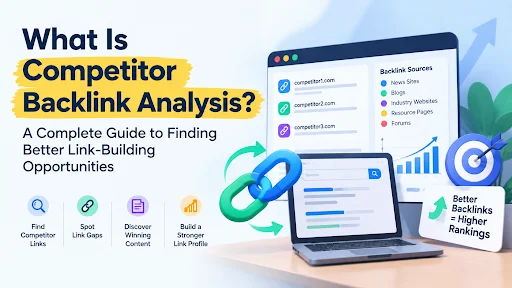
Analyse Competitors’ Backlinks
Look at where your competitors get their links. This can reveal publications and communities open to linking to sites like yours. You might not have thought to approach them before.
Discover New Link-Building Opportunities
Backlink data does more than show what already exists. It can point to resource pages. It can point to guest posting spots. It can point to industry roundups looking for content like yours.
Identify Suspicious or Low-Quality Links
Sometimes a site picks up backlinks it never asked for. These can come from scraper sites or spam directories. They can also come from a negative SEO attempt. Checking your backlink profile helps you catch these early.
How to Check Backlinks of a Website
This is the part most people want. Let’s get into the methods.
Method 1 — Use Google Search Operators
You can try a simple Google search operator:
link:yourwebsite.comGoogle used to support this fully. Today it only shows a small, limited sample. It’s not a reliable way to see your full backlink profile. It won’t work well for competitor research either.
This method still has one good use. It’s useful for checking if one specific link exists. Maybe a journalist told you they linked to your article. Maybe you’re confirming a guest post went live. A quick search can confirm this faster than logging into a tool.
For anything bigger, you’ll need a real backlink source.
Method 2 — Use Google Search Console
Do you have Google Search Console access for a site? Then you already have a free, useful backlink source. It only works for sites you’ve verified, though.
Go to the Links report in the left-hand menu. You’ll see a few key sections:
- Top linking sites — the external sites sending you the most links
- Top linked pages — which of your pages get the most backlinks
- Top linking text — the anchor text other sites use to link to you
This data comes straight from Google. That makes it accurate for your own site. But it only shows backlinks Google has already found. It also won’t work for a competitor’s site. You’d need verified access to their property for that.
Method 3 — Use a Backlink Analysis Tool
Want to check any site beyond your own? You’ll need a dedicated backlink checker. Tools like Ahrefs, Semrush, and Moz run their own web crawlers. They build their own backlink databases. That’s how they can show links for any public website, not just ones you own.
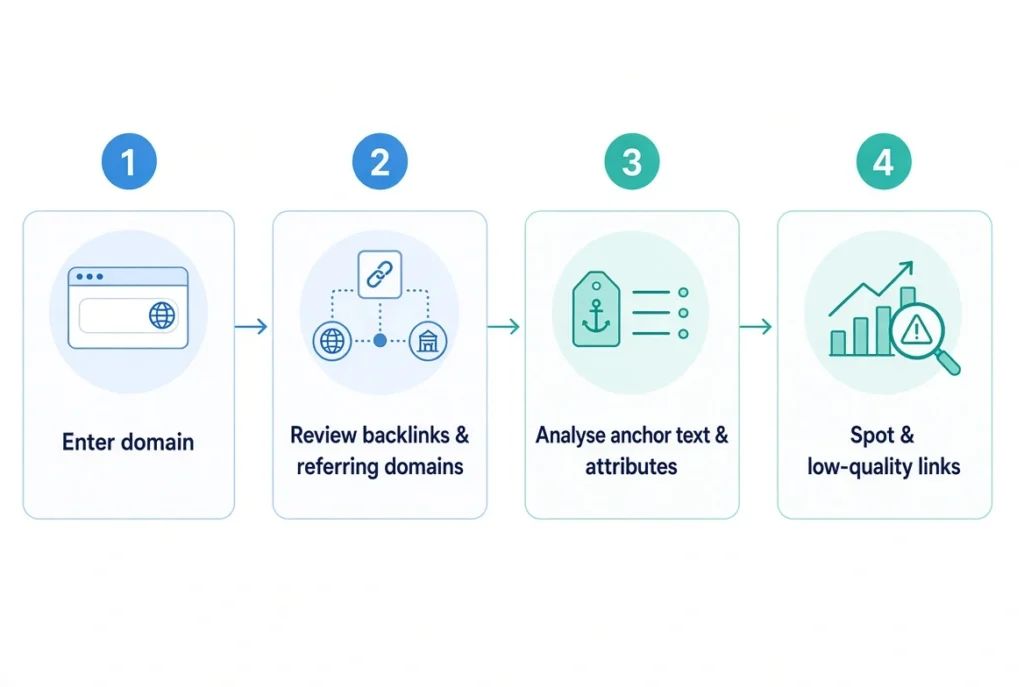
Here’s the general process, no matter which tool you use:
- Enter the domain into the tool’s backlink checker.
- Review total backlinks to get a rough sense of scale.
- Check referring domains, since this number often matters more than raw backlink count.
- Analyse anchor text to see what words link to the site.
- Check link attributes, like whether links are dofollow or nofollow.
- Review linked pages to see which pages get the most attention.
- Review new and lost backlinks to track changes over time.
- Compare competitor backlink profiles when doing competitive research.
Free versions of these tools show limited results. They also cap how many searches you can run per day. This is often enough for a quick check. A full audit usually needs a paid plan.
How to Check Competitors’ Backlinks
Once you can pull backlink data, the real value comes from using it well.
Step 1 — Identify Your Main Competitors
Start with the sites that actually outrank you. Don’t just list the businesses you’d call competitors in a meeting. A company can be your business rival while barely showing up in the same search results. The reverse is also true.
Step 2 — Analyse Their Backlink Profiles
Run each competitor through your backlink tool. Look at their total referring domains. Check how their profile has grown over the past year. Steady growth usually means an active link-building effort.
Step 3 — Find Their Strongest Referring Domains
Sort their backlinks by domain authority or a similar metric. Look at the sites at the top. These are the placements worth studying. What content earned that link? Could a similar approach work for you?
Step 4 — Analyse Their Anchor Text
Look at the words competitors use in the links pointing to them. This can hint at which keywords they target through link building. It can also show which links happened more naturally.
Step 5 — Find Websites Linking to Multiple Competitors
Do three or four competitors all have a link from the same site? That site is worth checking out. It likely accepts content or listings from businesses in your space. That makes it a realistic target for you too.
Step 6 — Turn Relevant Backlinks Into Link-Building Opportunities
This step needs judgment. A competitor having a backlink doesn’t mean you should chase the same one.
A link from an irrelevant site is not worth copying. Neither is one from a low-quality directory or an obvious paid placement. Focus on backlinks that fit your content and your niche. Don’t chase every link a competitor happens to have.
What to Look for When Analysing Backlinks
A backlink checker gives you data. Knowing what to do with it is a different skill.
Referring Domain Quality
Check if the linking site has real content and real traffic. Does it show an active presence? Or does it just exist to host outbound links?
Topical Relevance
A backlink from a site in your industry usually means more. This is true even if an unrelated site has a higher authority score.
Organic Traffic and Visibility
Watch out for sites with strong authority scores but almost no visitors. This can happen naturally. It can also be a sign of a link farm.
Dofollow and Nofollow Attributes
Dofollow links pass link signals in the classic SEO sense. Nofollow links, along with sponsored and UGC (user-generated content) links, historically didn’t pass that signal the same way. That doesn’t make them worthless. They still drive traffic and build visibility.
Anchor Text
The words in a link give search engines context. But a pattern that’s too uniform can look unnatural instead of earned.
Link Placement
A link placed inside the main body of an article carries more weight. A link buried in a sidebar or footer usually carries less.
Editorial Context
Ask yourself a simple question. Did the site include this link because it added value? Or was it clearly paid for or swapped as part of a deal?
Target Page
Check which page the backlink points to. A link to your homepage sends a general signal. A link to one specific article can help that exact page rank.
New and Lost Backlinks
Track backlinks gained and lost over time. This tells you if your link profile is growing, shrinking, or holding steady. A single snapshot can’t tell you that.
How to Identify High-Quality Backlinks
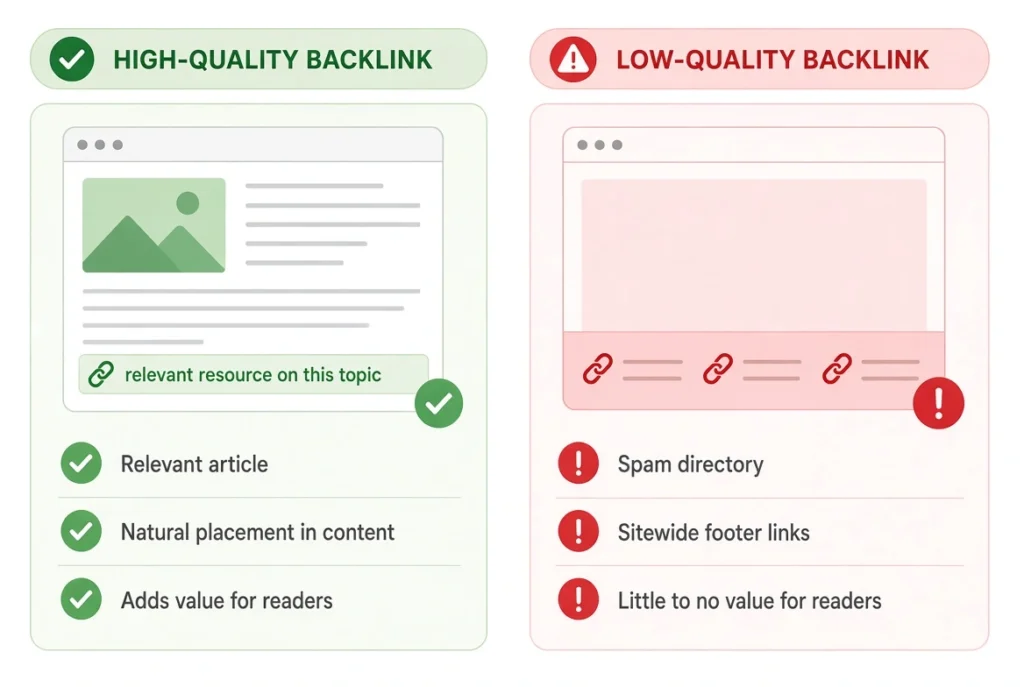
Use this checklist to judge any single backlink:
- Comes from a site relevant to your industry or topic
- Sits inside genuinely related content
- Was placed for editorial reasons, not bought or traded
- Has real potential to send referral traffic
- Uses anchor text that reads naturally
- Comes from a domain with real activity and visibility
- Sits in the main content, not a footer or sidebar
- Doesn’t come with obvious link-scheme signals, like dozens of unrelated sitewide links
Metrics like Domain Authority or Domain Rating are useful shortcuts. But they are estimates built by individual tools. Google doesn’t publish or endorse these numbers. Treat them as one clue, not a final verdict.
How to Check Backlink Anchor Text
What Is Anchor Text?
Anchor text is the clickable text of a link. In “check out this backlink guide,” the bold phrase would be the anchor text if it were a live link.
Common Types of Anchor Text
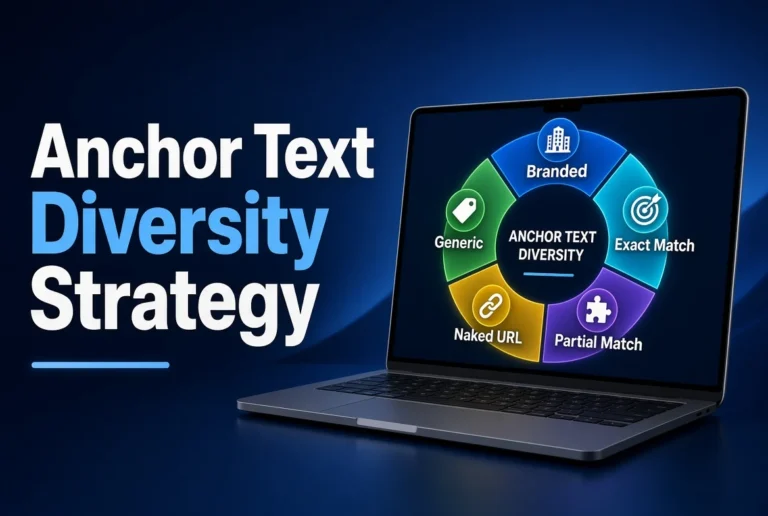
- Branded anchors — using the company or site name, like “ShahzadMarketer”
- Exact-match anchors — using the exact target keyword, like “how to check backlinks”
- Partial-match anchors — a variation of the keyword, like “checking a site’s backlinks”
- Naked URL anchors — the raw URL itself, like “shahzadmarketer.com/blog”
- Generic anchors — vague phrases like “click here” or “read more”
Why Natural Anchor Text Matters
A healthy backlink profile shows a mix of these types. That’s what happens when people link to you naturally. A profile where most links use the same keyword-heavy anchor tends to look forced. That’s something to avoid, not chase.
How to Analyse Anchor Text in a Backlink Profile
Most backlink tools let you export or filter anchor text. When you review it, look for:
- One phrase used far more than makes sense naturally
- A healthy mix of branded and keyword-focused anchors
- The real context each anchor appears in. The same anchor can look natural in one article and forced in another.
How to Check if a Backlink Is Dofollow or Nofollow
A dofollow link is the default type of link. It carries no special attribute telling search engines to ignore it.
A nofollow link carries a rel="nofollow" attribute. This was originally meant to tell search engines not to pass ranking signals through that link.
Two related attributes are worth knowing:
- Sponsored links (
rel="sponsored") mark links that are part of a paid placement or ad. - UGC links (
rel="ugc") mark links found in user content, like blog comments or forum posts.
Want to check a link’s attribute by hand? Right-click the link and select “Inspect.” Look at the <a> tag in the HTML for a rel attribute. Most backlink tools show this automatically. You won’t need to inspect anything by hand.
A nofollow link is not useless. It can still send real visitors. It can still build brand awareness. This value doesn’t depend on how a search engine classifies the link.
How to Find Suspicious or Low-Quality Backlinks
Irrelevant Websites
Say a gambling site links to a plumbing business. That backlink has no topical connection. It’s worth a second look, especially if you never expected it.
Spammy or Automatically Generated Pages
Some sites exist only to host large numbers of outbound links. These pages often have thin, auto-generated content. Backlinks from sites like this rarely help.
Sitewide Links
A link that appears the same way across hundreds of pages, like in a footer, gets weighted differently. A single link placed with intent inside an article usually means more.
Manipulative Anchor Text Patterns
Do you see a big cluster of backlinks using the same exact-match commercial keyword? Especially from unrelated or weak sites? That’s a common sign of a purchased link scheme.
Obvious Link Schemes
Some sites link to each other in circular patterns. Others trade links purely to trade them, not to reference anything genuinely useful. Both fall into this category.
Finding a suspicious backlink doesn’t mean you must act on it right away. Search engines have gotten better at spotting and simply ignoring weak links. They usually don’t penalise the site being linked to. Disavowing links is a real tool. But it’s mostly for cases with a manual action or a clear, deliberate attack. It’s not something to use every time an odd link shows up.
How to Use Backlink Analysis for Link Building
Backlink research isn’t just for audits. It’s also a practical way to find real link-building chances.
Find Websites Linking to Competitors
Sites that already link to businesses like yours are a good starting point. They’ve already shown they’re open to linking to your space.
Find Relevant Guest Posting Opportunities
Backlink profiles often show which sites accept outside writers. Look for a pattern of author bio links pointing to different businesses.
Find Resource and Editorial Link Opportunities
Some pages list tools, guides, or resources in your industry. These are often open to a relevant addition. This works best if your content fills a real gap in their list.
Prioritise Prospects by Relevance and Quality
Not every chance is worth chasing. Rank prospects by how relevant they are to your niche. Also weigh how much real value the placement would offer. Don’t chase every site with a decent score.
Build a Natural and Diverse Backlink Profile
Aim for links from many different domains. Use varied anchor text. Spread your links across different content types — guest posts, resource mentions, press coverage, and more. Variety looks like genuine interest. A narrow set of similar links does not.
Here’s a practical workflow that ties this all together:
Competitor analysis → backlink discovery → prospect qualification → outreach → relevant placement → link monitoring.
Each stage feeds the next one. Competitor analysis finds prospects. Qualification removes the weak ones. Outreach turns prospects into real placements. Monitoring tells you if those placements hold up over time.
Common Backlink Analysis Mistakes to Avoid
- Focusing only on the total number of backlinks. Fewer, stronger links often beat a large pile of weak ones.
- Looking only at domain authority or similar metrics. These are useful estimates. They are not the full picture of a link’s real value.
- Ignoring topical relevance. A high-authority link from an unrelated niche rarely beats a lower-authority, relevant link.
- Chasing exact-match anchor text. Overusing the same keyword phrase looks manufactured, not earned.
- Treating every nofollow link as useless. These links can still drive traffic and build trust.
- Copying competitor backlinks without evaluating them. Not every link a competitor has is worth chasing for your site.
- Ignoring lost backlinks. A shrinking link profile can go unnoticed if you never check for lost links.
- Building links from irrelevant websites. Volume from unrelated sites rarely helps your SEO.
- Assuming every suspicious backlink is harmful. Most weak links get ignored by search engines, not punished.
- Measuring link quality only by third-party metrics. These are estimates from individual tools, not numbers Google confirms.
Backlink Analysis Checklist
Use this as a quick reference:
- Total backlinks
- Referring domains
- Overall link quality
- Topical relevance
- Organic visibility of linking sites
- Anchor text distribution
- Link attributes (dofollow, nofollow, sponsored, UGC)
- Link placement within the page
- Target pages being linked to
- New backlinks gained recently
- Lost backlinks over time
- Competitor opportunities worth pursuing
Frequently Asked Questions
How can I check backlinks to a website?
Use Google Search Console for your own verified site. Use a backlink tool like Ahrefs, Semrush, or Moz for any public website, including competitors.
How do I check backlinks for free?
Google Search Console is free for your own site. Most backlink tools also offer a free tier. It has limited results, but it’s enough for a quick check.
Can I check my competitor’s backlinks?
Yes. Backlink checker tools keep their own crawled databases. You can look up any public domain, not just sites you own.
How do I know if a backlink is good?
Check if it comes from a relevant, active site. See if it sits inside related content. Confirm it was placed for editorial reasons, not bought or traded.
How can I check if a backlink is dofollow?
Inspect the link’s HTML for a rel="nofollow" attribute. Or use a backlink tool. Most tools show this automatically for each link they find.
How many backlinks does a website have?
This varies a lot. It depends on the tool you use. No single database captures every link on the internet. Different tools often show different totals for the same site.
What is the difference between backlinks and referring domains?
A backlink is one single link. A referring domain is the site that the link came from. One domain can hold several backlinks to the same target.
Are nofollow backlinks valuable?
Yes, in their own way. They can still bring real traffic and build brand recognition. This is true even though they historically didn’t pass direct ranking signals as dofollow links do.
Final Thoughts
Checking backlinks isn’t really about finding the site with the biggest number. It’s about understanding who links to a site. It’s about knowing why they bothered to link at all. It’s about judging how relevant those links are. And it’s about spotting which ones offer a real opportunity.
A smaller, highly relevant backlink profile usually beats a large one built from weak sources. Tools can pull the raw data fast. The real skill is reading what that data actually means.
Want someone to handle the research and outreach side of link building? That’s the kind of work we do at shahzadmarketer.com. We build relevant guest posting placements and white-hat links around sites that genuinely fit your niche.
About the Author
Shahzad Khan — SEO & Digital PR Expert, Founder of shahzadmarketer.com. Helps agencies and businesses get published on top-tier publications and build authority through white-hat link building.
Get in Touch
Questions about guest posting, press releases, or getting your brand featured on premium publications? Shahzad is available directly through the channels below:
Email: shahzad@shahzadmarketer.com
LinkedIn: https://www.linkedin.com/in/shahzadmarketer/
WhatsApp: +44 7848 475000
Website: https://shahzadmarketer.com
Response time: Usually within a few hours during working hours. Custom packages and publication queries welcome.
Тут сайте удастся почерпнуть важную информацию.
https://sorrybabushka.ru/interesting/290-volgogradskaya-oblast-snyala-trevogu-o-vozmozhnom-padenii-bespilotnika.html
Свадебная церемония считается важнейшим событием в жизни каждого.
Этот праздник означает начало совместной жизни.
Этот день объединяет этих любящих партнёров перед близкими и свидетелями.
http://penza-press.ru/lenta-novostey/300410/unikalnye-idei-podarkov-na-den-rozhdenija-dlja-zhenshhin-8-poleznyh-i-neobychnyh-podarkov
Церемония даёт влюблённым открыто признаться в любви и принести обеты.
Свадьба является памятью на долгие годы, поддерживая любовь супругов.
На этом же ресурсе можно обнаружить много полезной информации.
https://links.sneakero.ru/NbnLhvNlDnU1/
На этом ресурсе вы сможете обнаружить полезную информацию.
https://relax-spb.ru/read-info/3135-krovavyy-prikaz-tsentra-kak-v-ekaterinburge-ischez-pervyy-oligarkh.html
На этом же онлайн-ресурсе удастся получить массу нужных данных.
https://sorrybabushka.ru/interesting/515-comparative-review-beepbeep-casino-vs-top-competitors-in-2024.html
На этом портале вы сможете отыскать интересную информацию.
https://ipcfms.ru/read/426-kak-vybrat-krossovki-dlya-bega-po-raznym-tipam-trass.html
На нашем ресурсе удастся почерпнуть огромное количество актуальных знаний.
https://labdiz.ru/full/544-miks-kultur-etnicheskie-motivy-v-sovremennoy-mode.htm
На этом же онлайн-ресурсе можно почерпнуть массу ценной информации.
На нашем интернет-портале есть возможность почерпнуть достаточно полезных ресурсов.
На данном онлайн-ресурсе удастся обнаружить много нужных данных.
На этом же ресурсе вы сможете обнаружить много актуальных знаний.